
NextPVR Forums
  • ______
  • Home
  • New Posts
  • Wiki
  • Members
  • Help
  • Search
  • Register
  • Login
  • Home
  • Wiki
  • Members
  • Help
  • Search
NextPVR Forums Public NextPVR Support Windows v
1 2 3 4 5 … 113 Next »
NPVR Red System Tray Icon

 
  • 0 Vote(s) - 0 Average
NPVR Red System Tray Icon
lemmy999
Offline

Junior Member

Posts: 41
Threads: 11
Joined: May 2018
#1
2026-11-08, 03:45 PM
Windows 10
NPVR 7.0.1 (241229)
HDHomeun Tuner (2 tuners)

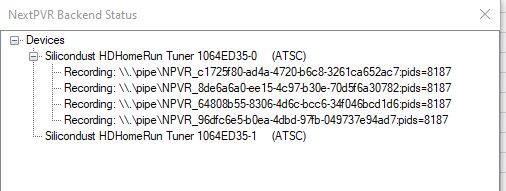
Every 1-2 weeks I schedule a recording of a sporting event on Sunday.  I've never had an issue until this year.  The NPVR system try icon will be red.  If I click "show status", it will show that one of the tuners appear to be recording. However there are no files being written to the recording directory, and when I check the status of the HDHomeRun tuners by opening a browser and typing in the HDHR IP address, it indicates Tuner 0 and Tuner 1 are both not in use.  I stop and start the NPVR service and this seems to fix the red NPVR tray icon.  I then schedule the recording and everything works fine. After the recording is finished I am fairly certain the system tray icon returns to green.  But then the next time I try to schedule, it shows red again.  

I do have some recurring recordings as I have attempted to record all episodes of a couple of older series.  However most of the episodes have been recorded, so the last recordings that happened of these series have been several months to even a year ago.  (5/9/2024, 4/18/2026, etc).  Using the web app, the only failed recordings are from 4 years ago.  

Any idea what could be causing this?  Below is a screenshot of the NPVR Backend Status
 
[Image: npvr.jpg]


Thanks for any advice.  

,
mvallevand
Offline

Posting Freak

Ontario Canada
Posts: 57,055
Threads: 1,004
Joined: May 2006
#2
2026-11-08, 04:01 PM
Are you sure about your version NPVR 7.0.1 (241229) If so there have been changes int the OTA ATSC update over the last 2 years that cause those line and you should update. If you have the logs send the zipped logs.

Martin
lemmy999
Offline

Junior Member

Posts: 41
Threads: 11
Joined: May 2018
#3
2026-11-08, 04:16 PM (This post was last modified: 2026-11-08, 04:17 PM by lemmy999.)
Yes, I haven't updated in a while.  This version had been working for a while so I didn't want to risk changes unless necessary...maybe it is now!

I have looked through the log for the tuner-0 and found that it appears to be trying to tune to local stations that I never use at 4:44 AM and has done so today (Nov 8) and yesterday (Nov 7). 


The zipped logs are attached.


Attached Files
.zip   logs-20261108-1050.zip (Size: 1.51 MB / Downloads: 1)
mvallevand
Offline

Posting Freak

Ontario Canada
Posts: 57,055
Threads: 1,004
Joined: May 2006
#4
2026-11-08, 04:23 PM
You have got 10 channels set for OTA update not schedules direct.

2026-10-27 04:44:55.033 [DEBUG][87] 10 channels configured to use ATSC-EPG
2026-10-27 04:44:55.033 [DEBUG][87] - 7337: 28.8 Decades
2026-10-27 04:44:55.033 [DEBUG][87] - 7338: 28.9 R-N
2026-10-27 04:44:55.034 [DEBUG][87] - 7341: 28.11 SBN
2026-10-27 04:44:55.034 [DEBUG][87] - 7342: 28.12 QVCII
2026-10-27 04:44:55.034 [DEBUG][87] - 7346: 30.1 HSN
2026-10-27 04:44:55.034 [DEBUG][87] - 7347: 30.2 QVC
2026-10-27 04:44:55.034 [DEBUG][87] - 7348: 30.3 HSN2
2026-10-27 04:44:55.034 [DEBUG][87] - 7349: 30.4 QVC2
2026-10-27 04:44:55.034 [DEBUG][87] - 7350: 30.5 QVC3
2026-10-27 04:44:55.034 [DEBUG][87] - 7351: 30.6 DABL

You can set them to None (or remove them if you don't need them) or see if check to see if they are in SchedulesDirect. The might be in the new Silicondust guide if you do upgrade. If you continue to use the old version and do OTA updates you will see those errors.

Martin
lemmy999
Offline

Junior Member

Posts: 41
Threads: 11
Joined: May 2018
#5
2026-11-08, 04:52 PM
Yes, Schedules Direct does not have listings for those channels.

Thanks for the information. Are you saying that OTA EPG data from the TV Stations have changed in the last couple of years?

I assume I just need to download the latest version, stop the service, run the installer, then start the service again? In other words, I do not need to uninstall anything, right? Thank you.
mvallevand
Offline

Posting Freak

Ontario Canada
Posts: 57,055
Threads: 1,004
Joined: May 2006
#6
2026-11-08, 05:19 PM
The OTA EPG process on Windows has improved and there were bug fixes along the way too.

I think it is a good idea to manually stop the service as you suggest but the installer will restart it. No uninstall required.

Martin
« Next Oldest | Next Newest »

Users browsing this thread: 1 Guest(s)


Possibly Related Threads…
Thread Author Replies Views Last Post
  NPVR to download recordings from STB/DVR? Joram 7 431 2026-11-03, 05:44 PM
Last Post: mvallevand
  NPVR Tray stuck showing EPG Updating Bobins 11 1,585 2026-09-20, 05:23 PM
Last Post: mvallevand
  Closed captioning in NPVR Joram 39 5,961 2026-09-10, 06:27 PM
Last Post: sub
  How to program the Green Button to launch NPVR? Joram 11 2,288 2026-08-20, 01:56 PM
Last Post: Bobins
Thumbs Down New USB Stick works with TVRPlayer won't scan channels in NPVR SteveEllard 1 669 2026-08-01, 06:33 PM
Last Post: mvallevand
  Continued issues, how is this not related to NPVR? Ricknextpvr 12 2,583 2026-06-23, 10:45 PM
Last Post: Ricknextpvr
  Problems with NPVR offline installation Joram 11 1,964 2026-06-15, 11:46 PM
Last Post: sub
  Cableco DVR with six tuners, can NPVR use more than one? Joram 9 1,517 2026-04-28, 04:31 PM
Last Post: Joram
  NPVR UI not picking up TV signal Joram 9 1,523 2026-03-15, 10:06 PM
Last Post: Joram
  NPVR UI shutting down spontaneously Joram 19 3,004 2026-03-13, 05:28 PM
Last Post: mvallevand

  • View a Printable Version
  • Subscribe to this thread
Forum Jump:

© Designed by D&D, modified by NextPVR - Powered by MyBB

Linear Mode
Threaded Mode
