Sorry if this is a FAQ, but I want to double check before buying a unit -
after 4 very happy years with a GBPVR/MVP setup, I decided to upgrade to HD. Two frustrating months later I am throwing in the towel on trying to use my computer to watch shows as well as record them, and want to return to the simple reliable pairing of a computer doing the recording and a MVP-like device for watching. My setup is 2 SD tuners into a Hauppauge 150/2250 pair, and a single HD tuner into a HD-PVR. It sounds like the PCH is what I want, but -
1) Is comskip working with the PCH? Including HD .ts recordings from the HD-PVR? Will pausing a show mess things up?
2) Can I LiveTV/slipstream seamlessly on both HD and SD recordings?
3) Can I have a PCH on my HD set and an MVP on my SD set? I know that the MVP will only play SD recordings.
My headaches with the PC mostly revolve around the audio getting out of synch with the video so that is my major concern with the PCH.
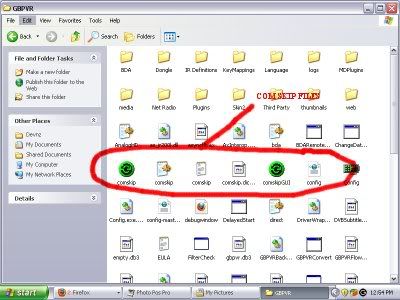
Hi I have just installed the Comskip files in the main directory of GBPVR. I do not know how to either configure or activate Comskip to work with live channels or recorded shows. I own a HP Compac business tower with a Pentium 4 CPU 2.8 GHZ Mobo and 1 gig of ram also have a INVIDIA GEForce 6200 256 mb video card. Any help would be greatly appreciated.
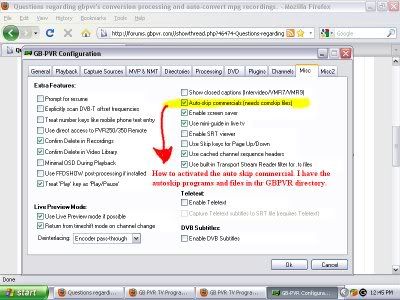
I have the Auto Comskip file checked in extra features.
I have Comskip checked off in commercial directories but I am stumped on how to activate its feature. Any help would be appreciated
This morning I started out running a perfectly functioning GBPVR 1.4.7 on Vista. I decided it was time for Win 7 x64 and did a fresh install.
I re-installed my HD HOMERUN and GBPVR 1.4.7 software.
tuner 0 is digital OTA
tuner 1 is digital QAM
I copied back the bda.ini, config.xml and gbpvr.db3 files.
I opened up the Win7 firewall to allow full access to config.exe, GBPVRRecording Service, and PVRX2.
If I go into config, I can scan tuner 0 just fine, and all the stations seemed to be mapped properly.
if I try to scan tuner 1 (digital QAM) it hangs forever scanning 3 of 8.
if I go into PVRX2, and I go into the TV Guide, it just pops back out. The log file says there are no channels configured, which is false from what I can see.
PVRX2 also does not show my previously recorded shows, nor my pending shows.
The log file for the recording service does seem to pick up and appears to be scheduling my pending shows.
Just changed my capture card from an Asus PE9400 to a Hauppauge HVR1600. This is an analog config. I have a problem where when I click "watch" it tries to start and after 10 seconds reverts back to the guide. I have uninstalled and reinstalled.
Which log files should I post up here to find out what is ailing this box? I am not fond of Media Center. I am running WIN7 x64 Ultimate
Questions regarding gbpvr's conversion processing and auto-convert mpg recordings.
Hi, I have just installed and configured the GBPVR program and is working fabulous. I love all the features and easy to navigate menus. Configuring my Hauppauge WinTV-HVR 1600 internal HDTV card was a snap. The Hauppauge remote works great with all recording and guide features. I have a HP Compaq business tower pc with a P4 processor 2.8 ghz motherboard and 1 gig of ram. My video card is a NVIDIA GE Force 6200 video card.
I was able to use the record features in manual, auto record and quick record. Recorded tv programs well with medium quality. I would like to get the recordings down in size from the usual gig and over files per hour. My goal is to record tv shows for web uploads like megaupload and share with my friends and family but would like to get the files recorded and converted to XviD and in AVI. format with little quality loss.
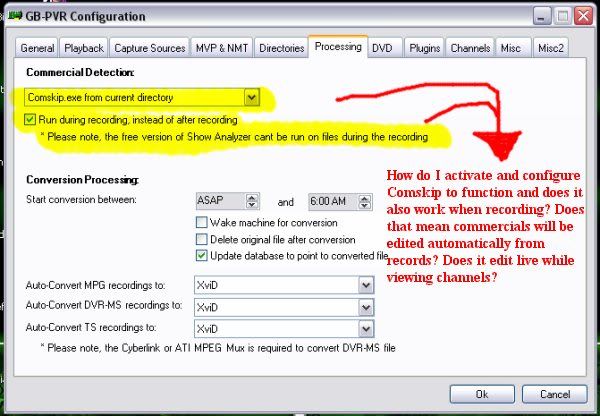
I have a few questions. If anyone would help I would greatly appreciate it. I included a screenshot.
1. I do not know how to actually have the program perform a conversion in the conversions process mode (XviD) format and would like to test out a show for file size and quality.
2. Is this actually possible to convert recorded shows to Xvid format ?
3. Is there a pluggin for AVI. conversion or maybe GBPVR already can?
4. Is there a pluggin to compress video to avi with XviD codecs with little quality loss. I do know of programs that do this but I was wondering if GBPVR can perform the conversion and compression.
Any help would be appreciated. thanks again my email is oc3ddie@yahoo.com
Both LiveTV and Recordings thru the PVR-150 are fine and have sound.
I can sorta view LiveTV (but without sound) through either of the HDHR tuners. I think maybe I'm missing a sound decoder... I found a post that said "Install AC3Filter (Lite) to fix no Sound in Playback..." Maybe that's what I need. I tried playing one of my HD recordings from my old PVR in GB-PVR and it does not have sound either. But if I play the recording in Windows Media Player, the sound plays fine so now I'm not so sure. I was hoping that I could atleast record stuff and worry about the sound issue later (I was thinking we could atleast watch the recordings thru WMP if we had to till I sorted that out).
Anyway, the first time I try to watch one of the channels on the HDHR, I was getting low/no signal strength and I would get kicked back to the menu. If I tried to watch it again or choose another channel, it would tune in just fine. I found an entry in the config.xml that says something like "BDASubmitTuningRequestTwiceOnLiveTV" and after setting that to "true", i would briefly see the no signal message, then the channel would tune in fine.. I don't think this is a fix though and maybe why it's not recording. If I chose a show to record, I usually get two small files created and that is all. GB-PVR says it's recording, but the file(s) do not grow.
While testing this, I just picked a show "Curling" to record and I looked in the GBPVRRecordingService.exe.log file and found:
Code:
2010-04-14 22:55:39.027 VERBOSE [5] BDARecordingSource about to start recording  oid:1 channel:T:643250,0,0~P:1~V:2048~A:2049~PMT:49~PCR:2048~N:>643250.1  Unknown2* (000(AC3)) file:D:\GBPVR\Recordings\Curling\Curling_20100414_22002300.mpg
...
2010-04-14 22:56:04.167 INFO [5] Recording is unusually small. Giving second chance: D:\GBPVR\Recordings\Curling\Curling_20100414_22002300-1-2.dvr-ms  (5610)
Any ideas on the sound, tuning, or recording issues?
Many people have noted there is a problem in GBPVR 1.4.7 playing LiveTV which causes MVP's and NMT's to "hang" if you keep it on the same station for a couple of program changes. I think I've figured out a hack that seems correct this by having the mvpmcx2 send the LiveTV key at the appropriate moment. I've been very pleased with my results and I'd like to see how this works for you. If any of you would like to try the attached and leave your NMT on one channel for a long period of time that would certainly help me test.
This seems to have the added benefit that it also fixes problems I had with the future view (hitting play on a show in the future that gets selected as blue) not working but I have to test this more.
Edit: This file is now available as part of the standard mvpmcx2 install with NMTInstall