Is it possible to set the default startup activity to "Live TV" in v5?. I've got the following line in the config.xml file but it doesn't seem to have any impact when I launch the desktop client:
Over the last week I have using my ODroid N2 with Kodi Matrix and I have found it to be tremendous client. It's nice being able to power off a box with the remote.
Edit this also works with the RPi4 and LibreElec 10.
I decided to see how hard it was to set up NextPVR server without Docker and as it turns out it is really quite easy. I still have issues with transcoding with ffmpeg, it doesn't make the box faster but it does remove the overhead of running Docker.
I was able to get an HDHR and even a locast tuner going so it is hard to imagine a better combination for light PVR requirements.
To install NextPVR server here are the steps
1. In CoreElect/LibreElec Addons install the Netcore binaries from ?Elec Addons ->Programs
2. Start a ssh session and do the following. Make sure you do this after NetCore is installed
3. Run dotnet with no parameters to make sure it is installed
4. Get the install script
- download and unzip the attached file
- chmod +x nextpvr-elec.sh
5. Configure dtv-scan-table (optional)
If you are installing a digital tuner (dvb, atsc, qam) you need to install a scanning table. Otherwise skip to the next step 6
- Note that CoreElec and LibreElec may not support your tuner. Check /dev/dvb to see if there are adapters in that directory. If not you will need to work this out on the CoreElec and LibreElec forums before proceeding.
a. Download the updated binary from here https://forums.nextpvr.com/showthread.ph...#pid555747 and copy it to /storage/.kodi/addons/nextpvr-server/ This is temporyary until the next version of NextPVR is released.
b. runnano nextpvr-elec.sh and find
dtv_scan_table=0
and change 0 to 1 or 2.
# 0 = placeholder, 1 = crazycat69, 2 = tvheadend
6. Install NextPVR server
./nextpvr-elec.sh
7. Configure NextPVR
You should be able to continue with a normal installation from a browser on your network
http:/ip:8866
Don't bother trying to test video in the browser there needs to be modifications to have this work properly, and only x64 boxes will be capable of doing the appropriate h264 transcoding at this time.
Hi, I need sme help with networking under Windows server 2019
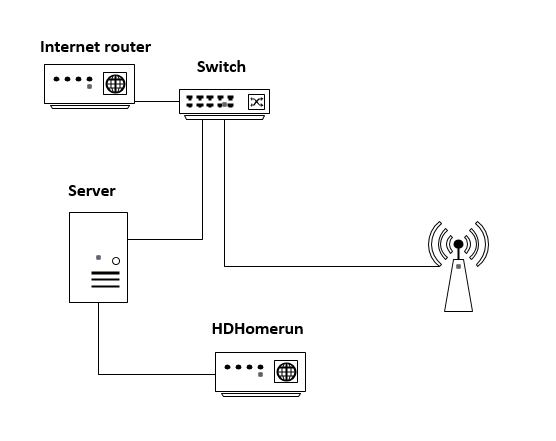
My home LAN has PFsense as a router and gateway which connects to my switch at 192.168.1.x
The local Windows server and HDhomerun tuner connect to the same switch and all was working well for the past months
But if the switch is quite busy (copy large files) the TV stream is sometimes interrupted.
The Windows server is doing recordings and I want them flawless
Now I added a second LAN card to the network server just for the HDhomerun tuner
I bridged both LAN cards in Windows with the 192.168.1.x scope
It worked but the stream from HDhomerun through the Windows server to Kodi was terrible slow
So how do I do this properly if it is possible at all ?
Give the second LAN card a different scope like 10.0.0.x
The HDhomerun can't have a fixed IP so unfortunately I'll need DHCP for the 10.0.0.x scope
Reconfigure nextpvr to find the device. Will this work ?
First of all I want to say that NextPVR is an amazing tool. This is by far the best tool i found to record my IPTV stream.
I went through the forum but could not find the answers to my questions so I am making my own thread.
First the question and after that the issues.
Questions:
1 - Can I record multiple channel from the same IPTV provider? (One m3U file)
2 - If yes can I record multiple show at the same time but on different channels? (One TV show on channel A from 8 to 10 and another one from 7:30 to 11 on another channel)
3 - Is there a limit on how many channels recording at the same time I can do? (I need to record 6 channels and between 3 to 4 TV shows at the same time on different channels)
4 - Is it possible to have each TV shows recorded to their own folder?
Issues:
Sometimes I have my recording going back 20 to 30 seconds (video and audio) and then keep going like normal. In the end i am not missing anything but I have a kin of 30 seconds loop.
I noticed that on different channels and I have no idea if this is due to:
- My IPTV provider
- NextPVR
- The recording starting at the same times
- Multiple recordings
You will find attached my logs.
If anyone can point me in the right direction that would be appreicated !!!
NPVR Server running on Windows 10
There appears to be an issue with the Directory dropdown on the recording edit dialog on the Schedule web page.
I have defined one additional directory called TV. If I edit a recording to set the directory to TV any subsequent edits show TV even though the directory is the default (empty string) in the DB.
If the db entry is '[Default]' then this is displayed correctly so it seems that the default entry for the filename field in SCHEDULED_RECORDING table (empty string) does not set the Directory dropdown in the dialog, so it shows the last used value. The workaround is to reload the schedule page.
I setup NextPVR 5 on friday night. I made sure everything worked properly including comskip.
The only thing I didn't test was the automatic wakeup. And of course, that didn't work . None of my scheduled recordings went through.
I checked the Windows event viewer, and the machine never woke up on 1/10, the day the recording was supposed to take place.
I never had this problem with NextPVR 4 on the same system previously. What could be causing this ? And how do I fix it ?
Excerpt from nrecord logs on 1/9
2021-01-09 02:21:26.052 [DEBUG][9] Reloading recording schedule
2021-01-09 02:21:26.054 [DEBUG][9] [KPIX 5 News at 11pm] at 1/9/2021 11:00 PM
2021-01-09 02:21:26.055 [DEBUG][9] Requesting wake up for 'RecordingOID868' [KPIX 5 News at 11pm] at 1/9/2021 10:57 PM
2021-01-09 02:21:26.055 [DEBUG][9] [NCIS: Los Angeles] at 1/10/2021 8:00 PM
2021-01-09 02:21:26.055 [DEBUG][9] Requesting wake up for 'RecordingOID864' [NCIS: Los Angeles] at 1/10/2021 7:57 PM
2021-01-09 02:21:26.055 [DEBUG][9] [NCIS: New Orleans] at 1/10/2021 9:00 PM
2021-01-09 02:21:26.055 [DEBUG][9] Requesting wake up for 'RecordingOID865' [NCIS: New Orleans] at 1/10/2021 8:57 PM
2021-01-09 02:21:26.055 [DEBUG][9] [KPIX 5 News at 11pm] at 1/10/2021 11:00 PM
2021-01-09 02:21:26.055 [DEBUG][9] Requesting wake up for 'RecordingOID869' [KPIX 5 News at 11pm] at 1/10/2021 10:57 PM
Unfortunately the machine never woke up on 1/10 at all and all recordings were missed.
I have tried scheduling more recordings and putting the machine to sleep, and it still never wakes up for any of them.
Today I noticed that when watching an in-progress recording (via Kodi, if that's relevant) it doesn't remember my resume position if I'm "too close" to live. Is this the expected behavior?
My situation was that I was watching an NFL game that was being recorded, and I was basically caught up to live. I stopped playback to run some errands. When I tried to resume later, there was no resume option - it just started over from the beginning. I don't have any logs from this session, but can attempt to reproduce later if that's something you'd like to see.
I have quad tuner HDHomeRun.
If no tuners are in use and in the guide I select four current running shows to record this works great. The fifth show will give me an error "no tuner available".
BUT if 1 tuner is in use by another program (I my case TV Mosaic) and I only have three available for NextPVR and I then select three current shows to record it works.... BUT the fourth show won't give me an error.
If I then cancel 1 recording (from the three) and go back to the fourth show that didn't succeed to be recorded NextPVR thinks it is recording! I have to do cancel and go back to it again and press record.
Well, its done. I have officially dropped my cable subscription and shutdown NPVR. Not that I wanted to, but Cox forced me into it. I'm not sure what I'll turn to just yet, I don't really like any of my options, but I just know that how I had been doing things is no longer an option.
Thank you Sub for NextPVR. I really liked using it. Great product. Best of luck to you and all the others that make this product what it is.